> ## Documentation Index
> Fetch the complete documentation index at: https://docs.ctechnology.io/llms.txt
> Use this file to discover all available pages before exploring further.
# OEM Suite introduction
> Getting started with the c.technology platform as an OEM.
The c.technology OEM Suite provides web-based tools to manage vehicle fleets, coordinate with partners, and oversee customer relationships.
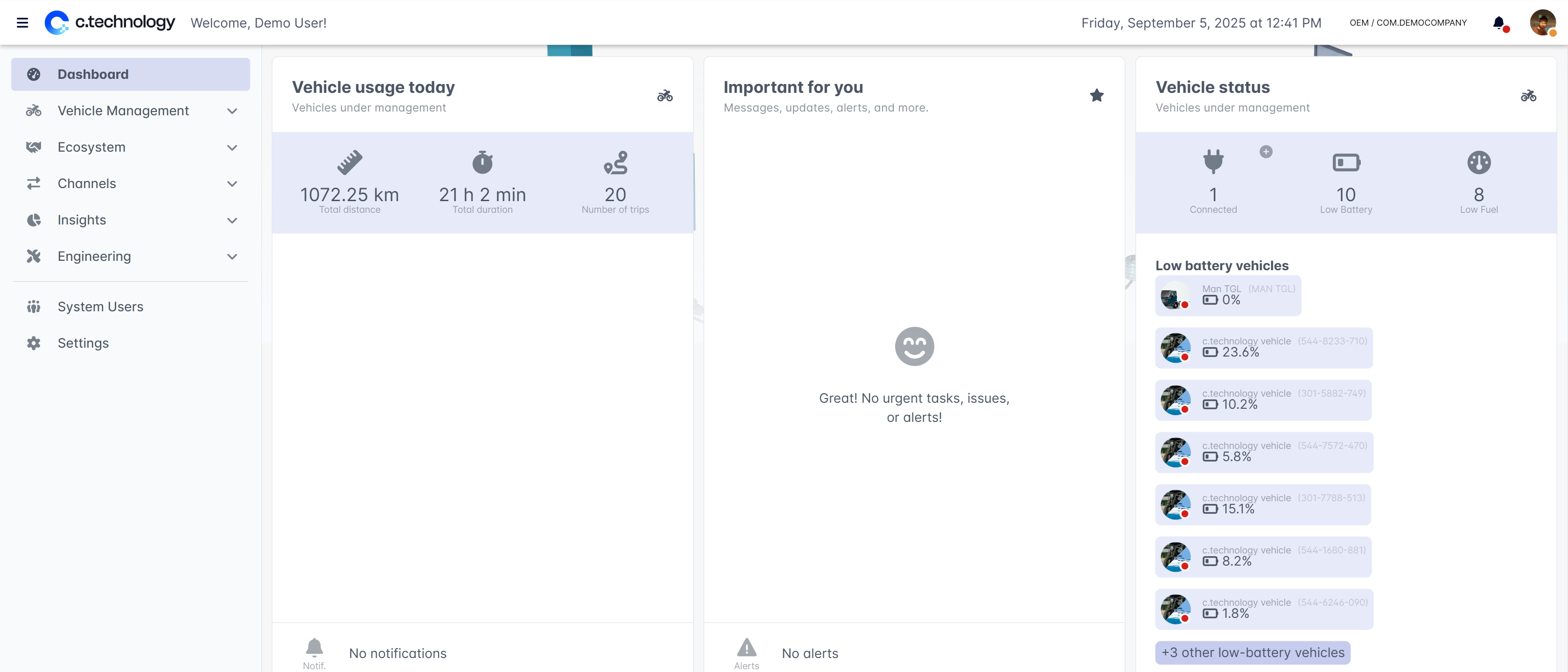 The dashboard shown upon login highlights key performance indicators such as the total usage of vehicles, what's currently important (e.g., maintenance, battery problems), and the current status of your fleet.
On the left side, you see the main navigation menu that allows you to access all sections of the OEM Suite.
Click the icon if the menu is hidden.
## Sections of the OEM Suite
The OEM Suite is divided into the following sections:
Manage vehicles, type taxonomy, documentation and checklists.
Partner overview and vehicle assignment, and customer overviews.
News articles, push messages, and support interactions.
Analysis of vehicle usage.
Maintenance management, error definitions, firmware updates, and IoT devices.
How to structure teams and organization settings.
The dashboard shown upon login highlights key performance indicators such as the total usage of vehicles, what's currently important (e.g., maintenance, battery problems), and the current status of your fleet.
On the left side, you see the main navigation menu that allows you to access all sections of the OEM Suite.
Click the icon if the menu is hidden.
## Sections of the OEM Suite
The OEM Suite is divided into the following sections:
Manage vehicles, type taxonomy, documentation and checklists.
Partner overview and vehicle assignment, and customer overviews.
News articles, push messages, and support interactions.
Analysis of vehicle usage.
Maintenance management, error definitions, firmware updates, and IoT devices.
How to structure teams and organization settings.