> ## Documentation Index
> Fetch the complete documentation index at: https://docs.ctechnology.io/llms.txt
> Use this file to discover all available pages before exploring further.
# Vehicle access
> Complete guide to accessing vehicles and managing user permissions in the c.technology platform.
Vehicle access in the c.technology platform is controlled through a permission system that enables secure, role-based access to vehicle data and functionality.
This guide covers both organizational vehicle access and individual user access scenarios.
## Access control overview
Generally, vehicle access is managed by two "barriers":
* **Permission barrier**: There are permissions for individual vehicles, as well as individual datapoints recorded by a vehicle. Permissions can be granted directly to users, or inherited via organizational membership.
* **Subscription barrier**: Similarly, there are subscription levels that determine which features and data types are available for a vehicle. Subscription levels can be assigned to individual vehicles, or inherited via organizational membership.
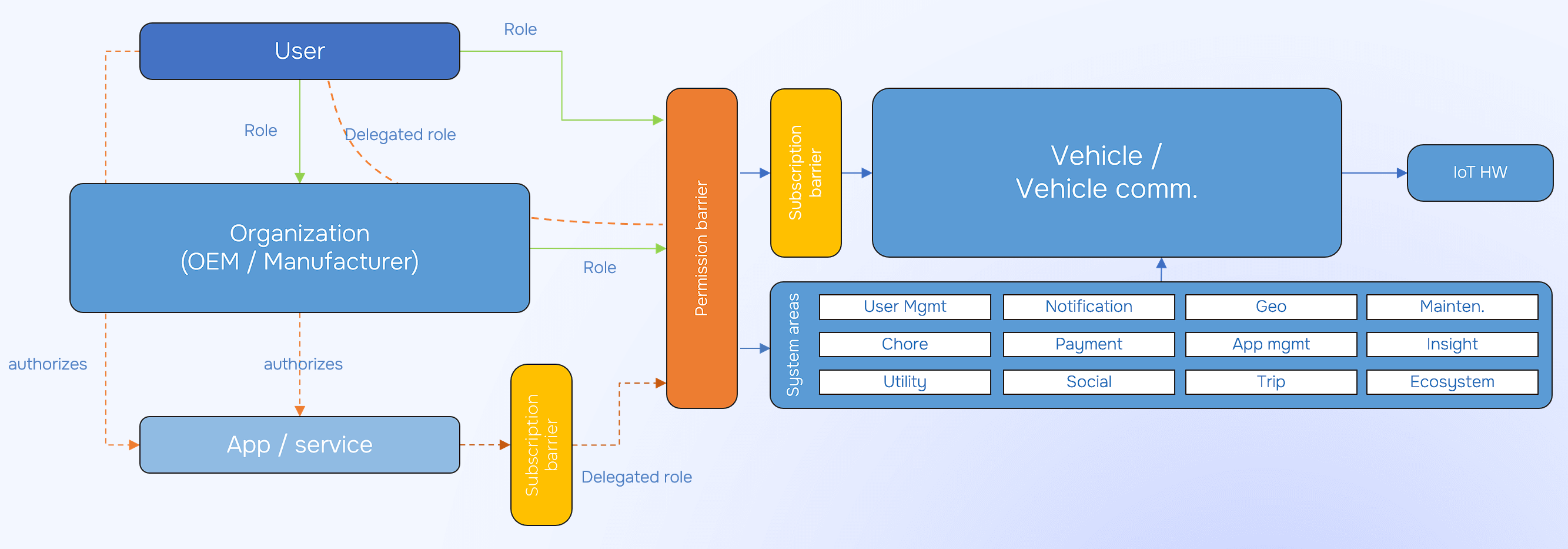 Note that federated vehicle access (via an organization) is handled fully transparently by the platform.
As such, users do not need to be aware of whether they are accessing a vehicle directly or via an organization.
However, for every request you can see the "reason" why you were able to perform it by inspecting the `permission_via` field in the `header` of the response.
This will show either `via: me` or `via: organization`, including additional information about the permission source, and organization.
If you have multiple permissions for a vehicle, all applicable sources will be listed.
## Understanding vehicle permissions
The permission system uses an exhaustive list of individual permissions that can be granted to users and organizations for vehicles.
Important example permissions include:
* **VEHICLE\_STATUS\_VIEW**: Full access to vehicle location, sensor data, and operational status
* **VEHICLE\_LOGBOOK\_VIEW**: Access to trip history and event logs
* **VEHICLE\_STATUS\_ANONYMIZED**: Access to vehicle data without location information
* **VEHICLE\_PROFILE\_EDIT**: Ability to modify vehicle settings and configuration
* **VEHICLE\_CAN\_UNLOCK**: Permission to unlock vehicle doors remotely
## Permissions for individual users
Each user can have permissions for the user account itself, as well as for an arbitrary number of individual vehicles.
Any change to individual user permissions will be immutably logged in the audit log, including information about who made the change and when.
## Permissions in the context of organizations
Organizations can have permissions for each member, as well as for the organization's vehicles.
Members (usually, though this may be restricted based on their permissions within the organization) inherit permissions for all vehicles owned by the organization, as well as vehicles shared with the organization.
Note that federated vehicle access (via an organization) is handled fully transparently by the platform.
As such, users do not need to be aware of whether they are accessing a vehicle directly or via an organization.
However, for every request you can see the "reason" why you were able to perform it by inspecting the `permission_via` field in the `header` of the response.
This will show either `via: me` or `via: organization`, including additional information about the permission source, and organization.
If you have multiple permissions for a vehicle, all applicable sources will be listed.
## Understanding vehicle permissions
The permission system uses an exhaustive list of individual permissions that can be granted to users and organizations for vehicles.
Important example permissions include:
* **VEHICLE\_STATUS\_VIEW**: Full access to vehicle location, sensor data, and operational status
* **VEHICLE\_LOGBOOK\_VIEW**: Access to trip history and event logs
* **VEHICLE\_STATUS\_ANONYMIZED**: Access to vehicle data without location information
* **VEHICLE\_PROFILE\_EDIT**: Ability to modify vehicle settings and configuration
* **VEHICLE\_CAN\_UNLOCK**: Permission to unlock vehicle doors remotely
## Permissions for individual users
Each user can have permissions for the user account itself, as well as for an arbitrary number of individual vehicles.
Any change to individual user permissions will be immutably logged in the audit log, including information about who made the change and when.
## Permissions in the context of organizations
Organizations can have permissions for each member, as well as for the organization's vehicles.
Members (usually, though this may be restricted based on their permissions within the organization) inherit permissions for all vehicles owned by the organization, as well as vehicles shared with the organization.